

Arduino Pushbutton Input Kit Price in Pakistan | AmpFlick
$ 6.47
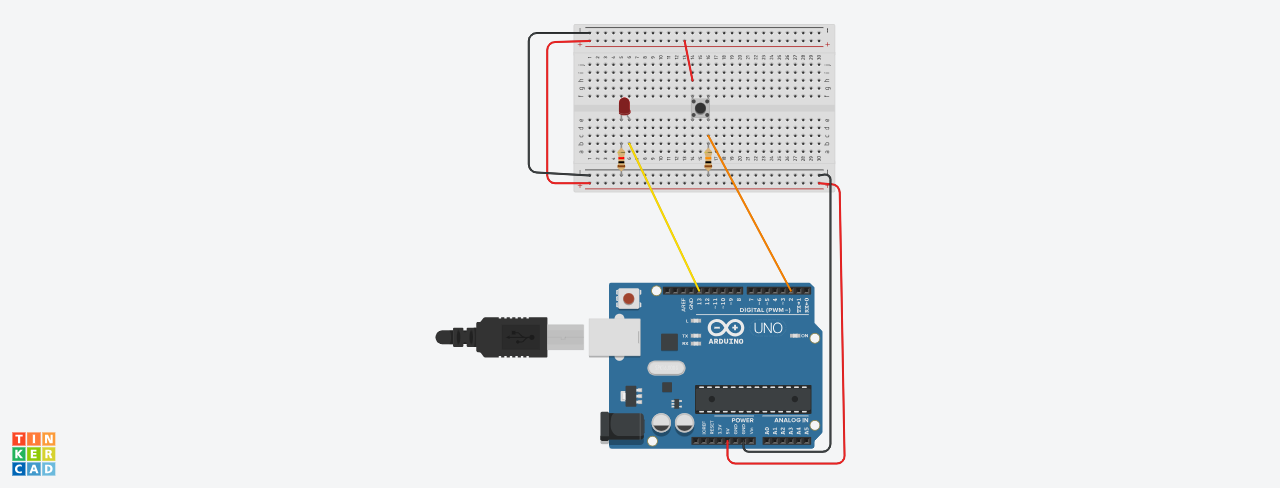
Description Master Digital Signals with the Arduino Pushbutton Input Kit This technical learning set allows users to interface tactile switches with microcontrollers for real-time interaction. Therefore, using the Arduino Pushbutton Input Kit is a perfect way to understand pull-up and pull-down resistor configurations. The system utilizes an Arduino UNO to detect state changes when the tactile button is pressed. Additionally, the kit provides two specific resistors for current limiting and signal stabilization. However, the breadboard interface allows you to modify the circuit for various interrupt-driven experiments quite easily. Technical Specifications for Arduino Pushbutton Input Kit Microcontroller: Arduino UNO R3 compatible board with ATmega328P processor. Input Switch: Tactile momentary push button for digital signal triggering. Pull-down Resistance: 10K Ohm resistor to ensure a stable ground state. LED Protection: 220 Ohm resistor for safe current limiting to the output. Visual Output: 5mm diffused LED for real-time switch state feedback. Prototyping: 400-point solderless breadboard with integrated power rails. Hardware Configuration and Usage First, seat the push button across the breadboard’s central divider. Connect one leg to the 5V rail and the other to a digital pin. Link the 10K resistor from the signal pin to ground for stability. Afterward, wire the LED and 220-ohm resistor to an output pin. Arduino Pushbutton Input Kit This diagram shows all kit components connected to simulate working. Advantages and Disadvantages of the Arduino Pushbutton Input Kit Pros: Provides an essential foundation for building interactive user interfaces and control systems. Furthermore, the dual-resistor setup teaches vital concepts regarding floating digital pins. Cons: Mechanical buttons may experience “bouncing” which requires software debouncing techniques. Precautions and Safe Handling Never connect 5V directly to a digital pin without a pull-down resistor. Ensure the button pins are oriented correctly before pressing into the breadboard. What is Included in the Package 1x Arduino UNO Compatible Board 1x 400-Point Breadboard 1x 10K Ohm Resistor 1x 220 Ohm Resistor 1x 5mm LED 1x Tactile Push Button AND PLEASE NOTE THAT ALL COMPONENTS ARE UN-ASSEMBELED. You have to assemble the kit your self. DRIVE LINK FOR .ino FILE AND CIRCUIT DIAGRAM: Click Here Tutorial on how to use this: Click Here Order more Learning Kits from AmpFlick: Click Here �� Connect with the Ampflick Community Stay updated with the latest hardware arrivals, project ideas, and engineering mentorship in Pakistan! Instagram: @Ampflick — Daily project reels & hardware fashion. LinkedIn: Ampflick Tech — Professional networking & career opportunities. WhatsApp Support: Link to WhatsApp — Technical queries and bulk orders. YouTube: Ampflick Official — Hardware masterclasses.